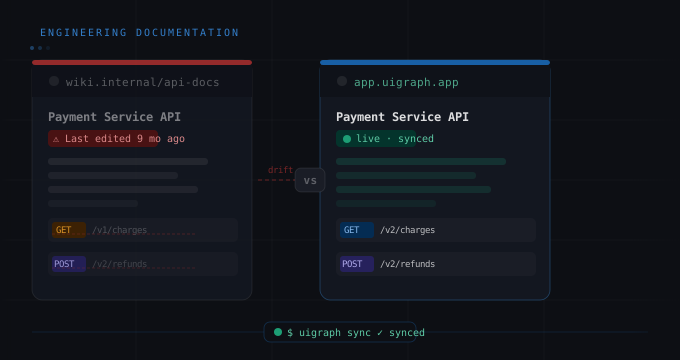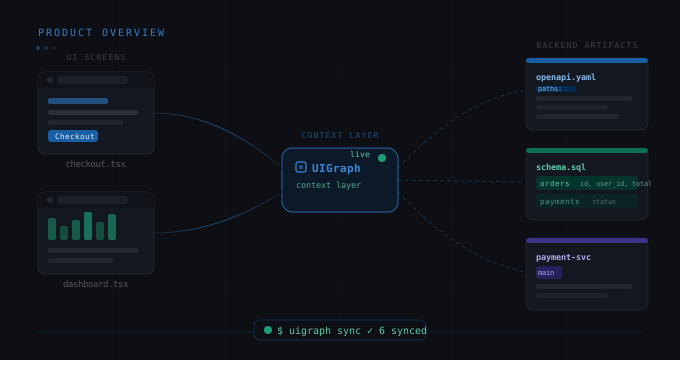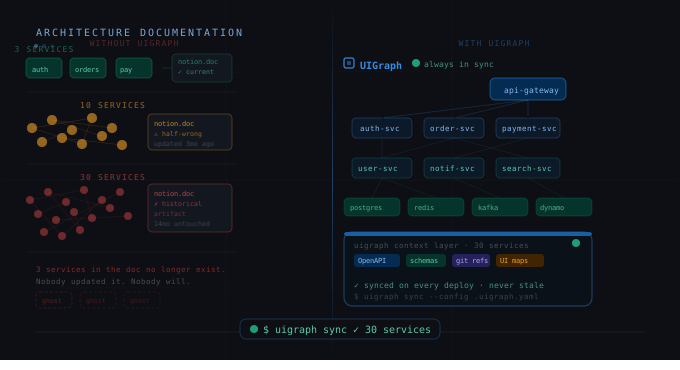
At 3 services, you can document everything in a Notion doc and it stays current. At 10 services, the doc is half-wrong. At 30 services, the doc is a historical artifact. At 50 services, the doc hasn't been touched in 14 months and three of the services it describes no longer exist.
This is the microservices documentation problem. It's not a discipline problem or a culture problem. It's a structural problem: text-based documentation doesn't scale with the complexity of distributed systems, and no manual process survives the pace of a team shipping across many services simultaneously.
This post covers the problems specifically, why standard approaches fail at scale, and the patterns that actually hold up when you're running 20+ services.
Why microservices are harder to document than monoliths
With a monolith, documentation can live in the codebase. A well-structured README, some API docs, a schema — it's all in one repo, one language, one deployment unit. You can point someone at the code and the context is local.
Microservices distribute all of that:
-
Each service has its own repo, its own schema, its own API spec, its own team, its own deployment cadence.
-
The interesting behavior often lives between services, in the integration layer — not inside any single service.
-
Service boundaries and ownership shift over time. The team that built Service A left, and now the team that owns Service B also maintains A, but neither is sure where A's docs are.
-
The UI doesn't correspond cleanly to a single service. A single page load on the frontend might touch 6 backend services. Documenting those connections requires a cross-service view that no single repo owns.
The result is that most microservices-heavy teams have two types of documentation: outdated architecture diagrams from a year-old Miro session, and individual service READMEs that are accurate for that service in isolation but tell you nothing about how it connects to the rest of the system.
The 4 specific failure modes to watch for
1. The "galaxy brain" architecture diagram
Every microservices team has one: the big diagram showing all the services as boxes connected by arrows. It exists, it was accurate on the day it was made, and it has been growing increasingly wrong ever since.
The problem is that this diagram is too abstract to be useful and too complex to maintain. It shows the services exist; it doesn't show you what happens when a user clicks "Place Order." The right response is not a better version of this diagram — it's a different kind of documentation entirely.
2. Service docs with no cross-service context
Individual service documentation — OpenAPI specs, READMEs, Swagger UIs — is useful within the service boundary but tells you nothing about where that service fits in the product. Engineers on the Notification Service shouldn't have to read the Order Service README to understand that the Notification Service gets triggered by order events. That relationship should be documented in a place that shows both services.
3. Zero link between the UI and the backend
Product teams are organized around features. Engineers are organized around services. The connection between a feature's UI and the services that power it is almost never documented. Someone has to know it, but that knowledge lives in people's heads — and it walks out the door when those people leave.
4. Ownership ambiguity
At 50 services with team rotations and reorgs, who owns what becomes genuinely unclear. Which team handles a bug in Service C? Who do you Slack about an API change in Service G? Microservices documentation needs to include explicit ownership metadata — team name, email, Slack channel, Jira board — not just technical specs.
The patterns that actually work
One Map per service, one project per product
The UIGraph model maps well to microservices: create one Map per service in UIGraph. Each Map contains the Frames (UI screens, architecture diagrams) relevant to that service, with Points linking to the service's API spec, database schema, test packs, and ownership metadata — all synced from the service's repository via the CLI.
Above the service-level Maps, create a project-level Map that contains a high-level architecture Frame — a Mermaid diagram showing the services and their major relationships. Place Map Points on each service box in the architecture diagram. These link directly to that service's detailed Map.
The result: you can navigate from a top-level architecture view into any individual service's detailed documentation in one click. The architecture diagram is not a dead image — it's a navigation layer.
Own the service metadata in the repo, not in the docs tool
Service metadata — ownership, team, Slack channel, Jira board — should live in the repository as .uigraph.yaml, not in a wiki page that someone has to remember to update. When ownership changes, the engineer updates the YAML as part of the handoff. The docs update on next deploy.
service:
  name: Order Service
  category: Backend
  description: Order lifecycle management — creation, fulfillment, cancellation
  ownership:
    team: commerce
    email: commerce@getorbis.io
  integrations:
    slack:
      url: https://getorbis.slack.com/archives/C-ORDERS
    jira:
      url: https://getorbis.atlassian.net/browse/ORDERS
Document the integration layer, not just the service layer
The behavior that's hardest to document and most valuable to understand is what happens between services. Map that as a feature-level Map in UIGraph, not as a service-level Map.
Example: a "Place Order" feature Map that contains the UI screens for the order flow, with Points showing which APIs are called at each step, which services own those APIs, which message queue events are published, and which downstream services consume them. This is the documentation that new engineers actually need, and it can't be generated from any single service's spec.
Cross-link service Maps with Map Points
When Service A calls Service B, place a Map Point in Service A's Map that links to Service B's Map. This creates a navigable dependency graph. An engineer debugging a production issue can follow the chain of dependencies through UIGraph without having to know the service graph from memory.
What this looks like at 50 services
At 50 services, the documentation structure looks like this:
-
50 service-level Maps, each synced from its repository via CI. Each contains API specs, schema diagrams, ownership metadata, test packs, and relevant architecture diagrams.
-
10-15 feature-level Maps documenting the major product flows that span multiple services (checkout, auth, notifications, user onboarding, etc.)
-
1 platform-level Map with a high-level architecture diagram where each service is a Map Point linking to its detailed service Map.
New engineers can navigate from the top-level diagram to any service and understand its full context in minutes. On-call engineers can follow dependency chains to debug production issues. PMs can understand which services are involved in a feature without asking an engineer to explain the backend.
That's not documentation as a chore. That's documentation as actual infrastructure.