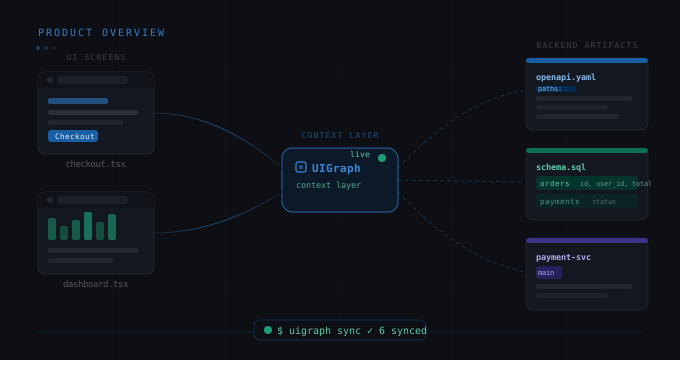
UIGraph is a visual system mapping tool. It lets engineering teams create interactive maps of their software systems — connecting UI screens and diagrams to the APIs, services, databases, and tests that power them.
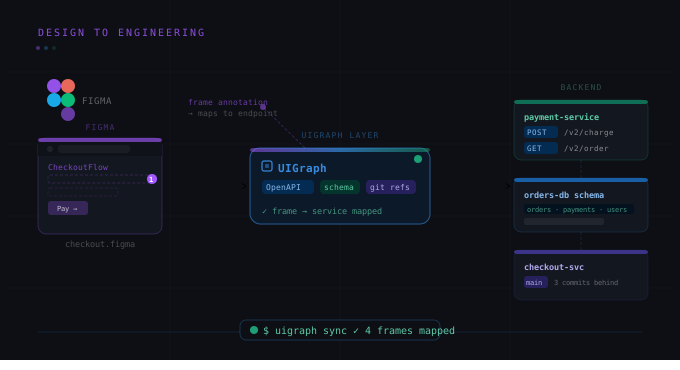
The shortest way to understand it: imagine clicking on the "Pay Now" button in a Figma screenshot of your checkout flow, and seeing the exact API endpoints that button calls, the service that owns those endpoints, the PostgreSQL tables that service writes to, and the smoke test that covers the happy path. Everything navigable, everything linked, everything in sync with your actual codebase.
That's UIGraph.
The problem UIGraph solves
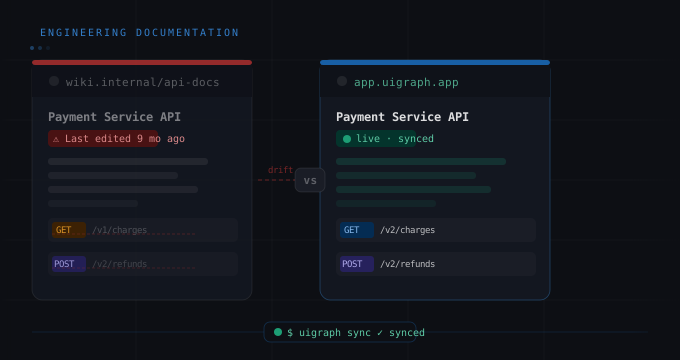
Most engineering teams document their systems in one of two ways: a wiki that's always out of date, or not at all. Both options have the same outcome — engineers spend weeks onboarding instead of days, context lives in people's heads instead of a shared system, and the gap between the UI your users see and the backend that powers it is invisible to everyone except the two engineers who built it.
UIGraph bridges that gap by treating your system documentation the same way your product works: as an interactive, navigable map of connected things.
Core concepts
Maps
A Map is the top-level container in UIGraph. Think of it as a bounded context — one feature, one service domain, one user flow. A SaaS product might have Maps for "Checkout", "User Authentication", "Admin Dashboard", and "Notification System."
Maps are how you organize engineering context at the feature level, not at the service level. That's intentional. Documentation organized around services tells you what exists. Documentation organized around features tells you how things work together.
Frames
Inside each Map are Frames. A Frame is a visual representation — a screenshot from Figma, a UI mockup, an architecture diagram, a Mermaid flow. You upload it to UIGraph and it becomes an interactive canvas.
For the getorbis.io team (a fictional SaaS platform we'll use throughout these posts), the "Checkout" Map might have Frames for the product selection screen, the cart review screen, the payment entry screen, and the order confirmation screen.
Points
Points are where UIGraph gets powerful. A Point is an interactive marker you place on a Frame — on a specific region of a UI screen or a specific component in a diagram.
There are three types of Points:
-
Implementation Points connect a UI region to engineering artifacts: API endpoints (from an OpenAPI spec), services, database tables, and test cases.
-
Map Points connect a region to another Map — so you can click from a high-level architecture diagram into the detailed feature Map that lives beneath it.
-
Frame Group Points define a region that contains multiple state variants — like a modal that has loading, success, and error states, each with its own nested Frame and Points.
Points are what turn a static screenshot into navigable engineering documentation. Instead of reading prose about what a button does, you click it and see the implementation directly.
The CLI: keeping docs in sync with code
The most important part of UIGraph for teams that ship frequently is the CLI. uigraph-cli sync reads a .uigraph.yaml configuration file from your repository and syncs your service metadata, API specs, architecture diagrams, test packs, and database schemas up to UIGraph — automatically.
The intent is that docs update in CI when code merges to main. Zero manual steps. Zero drift.
A minimal .uigraph.yaml looks like this:
version: 1
project:
  name: getorbis
service:
  name: Payment Service
  category: Backend
  description: Handles payment processing and subscription billing
  repository:
    provider: github
    url: https://github.com/getorbis/payment-service
  ownership:
    team: payments
    email: payments@getorbis.io
A full config can also specify API specs, Mermaid architecture diagrams, test packs, and database schemas — all synced from paths in your repository.
Database visualization
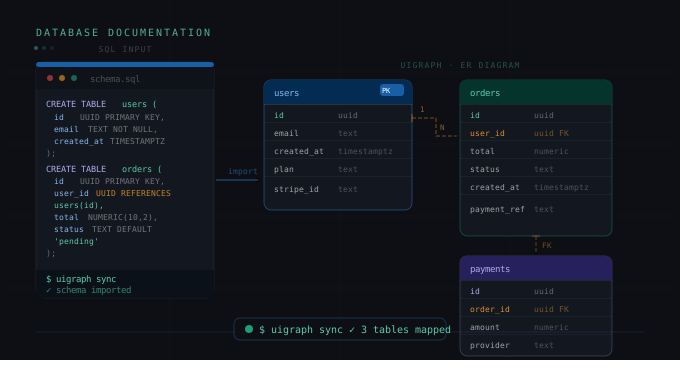
UIGraph includes AST-based parsing for SQL and NoSQL schemas. You point it at a .sql file or a JSON schema, and it generates an interactive entity-relationship diagram inside your Map.
Supported databases: MySQL, PostgreSQL, SQLite, generic JSON/NoSQL, and AWS DynamoDB.
The diagrams are not static images — they're interactive. You can navigate between tables, see foreign key relationships, and link specific tables to the service Maps that own them.
Who UIGraph is built for
UIGraph is built for engineering teams, not documentation teams. The primary personas are:
-
Engineering Managers who need a system-level view of what their team owns and how it fits together.
-
Senior Engineers and Tech Leads who need to onboard new engineers quickly and reduce the "why is the code doing this" support burden.
-
Backend Engineers who want their service metadata, API specs, and database schemas discoverable by teammates without maintaining a separate wiki.
-
Frontend Engineers who want to show exactly which APIs their UI screens call, without writing lengthy prose docs.
UIGraph is not a general-purpose diagramming tool. It's not trying to compete with Miro for workshops or Figma for design. It's specifically solving the engineering documentation problem: connecting the visual surface of your product to the technical implementation underneath it.
UIGraph vs other tools
The most common questions are about how UIGraph compares to tools teams already use:
vs Confluence/Notion: Wikis are text editors. UIGraph is a visual, interactive system map. Wikis require manual updates. UIGraph syncs from your repo. Wikis have no link between UI screens and backend services. That link is UIGraph's core feature.
vs Lucidchart/Miro: Diagramming tools create static drawings. UIGraph creates navigable maps with live-synced engineering artifacts. You can't sync an OpenAPI spec to a Lucidchart box.
vs auto-generated docs (Swagger UI, Storybook): Those tools document one layer of your stack in isolation. UIGraph connects all the layers — UI, API, service, database, tests — into a single navigable context.
Getting started
The fastest way to understand UIGraph is to map one feature end-to-end. Pick something small — a login flow, a single CRUD feature, a notification system.
-
Create a Map for the feature.
-
Upload one or two UI screens as Frames.
-
Add Implementation Points to the key interactive elements.
-
Link those points to your OpenAPI spec or service.
-
Add a .uigraph.yaml to your repo and run uigraph-cli sync.
Most teams get something meaningful on screen in under 30 minutes. The value compounds quickly — once one feature is mapped, the second one takes half the time, and new engineers start asking to see the Map on day one instead of week two.