If you're choosing a documentation tool for your engineering team in 2025, you have a lot of options. But when you strip away the surface-level differences, most of the debate comes down to three tools: Confluence (the default choice for larger orgs), Notion (the challenger that wins on UX), and UIGraph (the newcomer built specifically for engineering teams).
This post is an honest comparison. Not a features table designed to make one tool look good, but a clear-eyed look at what each tool is actually optimized for, where each one breaks down, and which problems they each solve well.
Spoiler: all three have valid use cases. The question is whether your use case is "engineering team documenting software systems" — because the answer to that specific question is pretty clear.
The fundamental question: what kind of documentation are you doing?
Before comparing features, you need to answer one question: what kind of documentation does an engineering team actually need?
There are two very different categories here, and most teams conflate them:
Category 1 — Static reference docs: Architecture decision records. Engineering principles. Onboarding guides. Process documentation. This content changes slowly and is primarily text.
Category 2 — Living system docs: Service maps. API documentation. Database schemas. UI-to-backend connections. This content changes every sprint and is primarily structural and visual.
Confluence and Notion are excellent at Category 1. They're poor at Category 2 for a structural reason: they're text editors with some diagramming add-ons, not system mapping tools. UIGraph is built specifically for Category 2 and doesn't try to do Category 1.
Most teams need both. The right answer for many teams is: UIGraph for living system documentation, Confluence or Notion for everything else.
Confluence
What it's good at
Confluence is mature, deeply integrated with the Atlassian ecosystem (Jira, Bitbucket), and has good page organization, access controls, and a large library of templates. For teams that live in Jira, it's the natural home for RFCs, ADRs, runbooks, and postmortems.
Where it fails for engineering docs
Confluence is a word processor with a hierarchy. Its core abstraction is a page. A page has text, maybe some tables, maybe an embedded Lucidchart or Miro diagram. That's it.
For living system documentation, this fails in predictable ways:
-
Diagrams are static images or third-party embeds. You can't click on a box in a Confluence architecture diagram and navigate to another page. You can't link a UI region to an API endpoint.
-
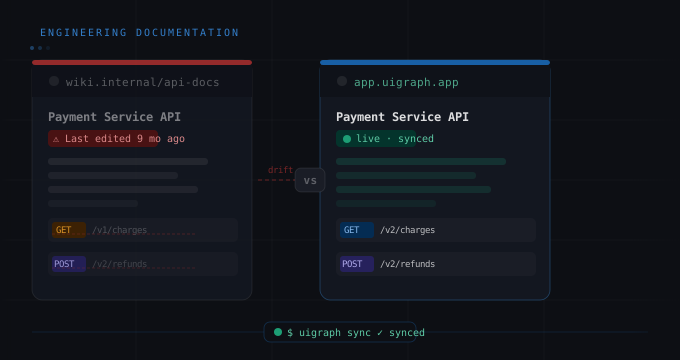
No sync with code. When your service changes, nothing in Confluence updates automatically. Every change requires a human to remember to update the page.
-
No structured engineering artifacts. You can't import an OpenAPI spec or a database schema and have Confluence render it meaningfully. You paste the YAML as a code block and format it by hand.
-
Discovery is text-based. Engineers search for pages by keyword, not by navigating from a UI screen to the backend. The mental model doesn't match how software actually works.
Notion
What it's good at
Notion wins on UX. It's significantly more pleasant to write in than Confluence, its database and table features are genuinely powerful for structured content, and it's flexible enough that teams can build useful internal tools on top of it. Many engineering teams use Notion for their sprint planning, design docs, and team wikis.
Where it fails for engineering docs
The same structural problem exists. Notion is a flexible document database. It's not a system map. Its diagrams require third-party integrations (Whimsical, Miro, Lucidchart), which brings all the same problems as Confluence: static images, no code sync, no navigation between UI and backend.
Notion's flexibility is also its weakness here. Because it can be organized in infinite ways, engineering teams end up with inconsistent structures across services — one team does a Notion database of API endpoints, another does a page per endpoint, another does a table in a doc. None of them are interconnected, and none of them stay up to date.
UIGraph
What it's built for
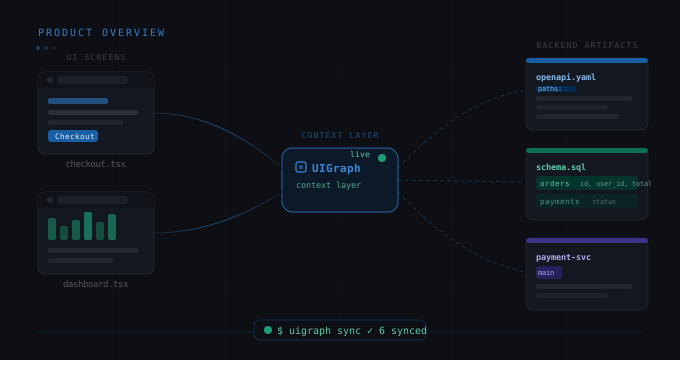
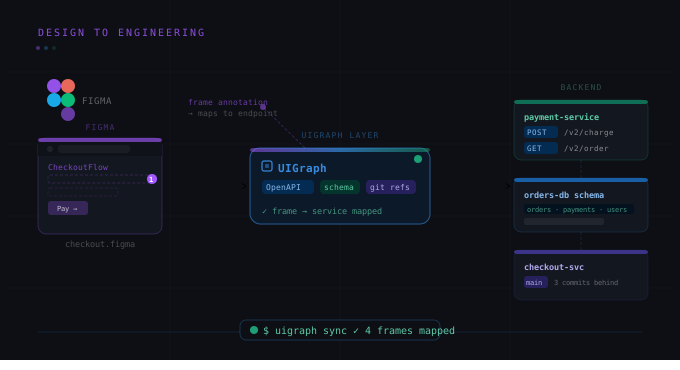
UIGraph is not trying to replace Confluence or Notion for static docs. It's solving a different problem: the navigation gap between the UI your users see and the technical implementation that powers it, and the freshness problem that kills all other documentation approaches.
What it does differently
The core differentiators:
-
Visual-first: documentation is a navigable map, not a list of pages. Start from a UI screen, drill down to APIs, services, databases.
-
Source-linked: API specs, database schemas, service metadata, and test cases sync from your repository via the CLI. Documentation updates automatically in CI.
-
Interactive: click any region of a screen or diagram to see the engineering context behind it.
-
Structured: Maps, Frames, and Points are a defined information architecture, not a freeform canvas. This means team documentation has a consistent structure regardless of who creates it.
Where UIGraph has gaps
UIGraph doesn't do freeform text documentation well. It's not where you write your ADRs or your on-call runbooks. It doesn't have a comments-on-text feature for document reviews. It's not a wiki and doesn't pretend to be.
Head-to-head comparison
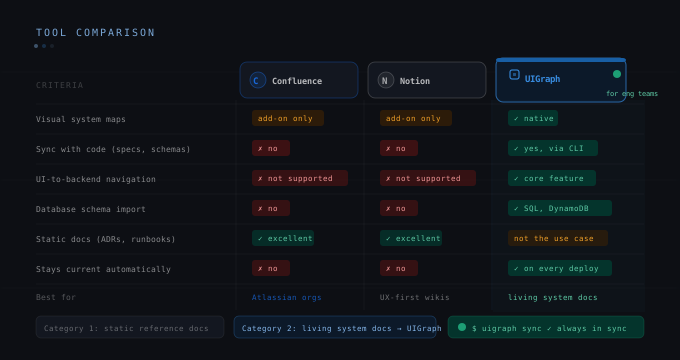
The table below scores each tool against the criteria that matter most for engineering system documentation:
Visual system maps: UIGraph — native. Confluence — add-on only. Notion — add-on only.
Sync with code (API specs, schemas): UIGraph — yes, via CLI. Confluence — no. Notion — no.
UI-to-backend navigation: UIGraph — core feature. Confluence — not supported. Notion — not supported.
Database schema import: UIGraph — native (SQL, DynamoDB). Confluence — no. Notion — no.
Static reference docs (ADRs, runbooks): UIGraph — not the use case. Confluence — excellent. Notion — excellent.
Team collaboration: UIGraph — comments and sharing. Confluence — excellent. Notion — excellent.
Jira integration: UIGraph — via service metadata. Confluence — native. Notion — third-party.
Learning curve: UIGraph — low (Maps/Frames/Points model is simple). Confluence — medium. Notion — low.
The recommendation
If your engineering team is asking "which single tool should we use for all documentation?", the honest answer is that no single tool covers everything well.
The practical setup that works for most engineering teams: UIGraph for living system documentation (the Maps, Frames, Points, API specs, schemas, and the CLI sync), plus Confluence or Notion for static reference content (ADRs, runbooks, onboarding guides, team processes).
If you're currently using Confluence or Notion and your engineering docs are perpetually out of date — which they are — the root cause is not the tool. It's that the tool has no mechanism to stay current with code. UIGraph's CLI sync is that mechanism. That's the gap worth closing first.